If you ask most web agencies for a landing page or a corporate website, chances are they’ll suggest WordPress + Elementor. It’s no coincidence: it’s the most widely used combination. However, if we honestly assess which technologies are best for each type of project, the reality is that “the most used” isn’t always “the best in every case”.
This post is the first in a series in which we’ll analyse technical decisions in web development with objective criteria, to help you decide with information and arguments.
Our goal is that, when you have to choose a technology for your website, you know what you’re choosing, why, and what you can expect from that decision.
This doesn’t mean one option will always deliver better results than another. But it can have more arguments in its favour: improving how the website works, making it easier to attract customers and, potentially, reducing long-term costs.
Because making a good decision isn’t about always getting it right, but about having the information and criteria needed to decide better.
Why WordPress + Elementor dominates the market
Understanding why something is so popular helps you understand when it’s worth applying it to your project. The reasons are clear:
- Low learning curve. With basic knowledge and some time, you can build a website with a drag-and-drop visual editor like Elementor. On top of that, there are thousands of tutorials on YouTube and plenty of training resources available to anyone.
- Low initial cost. Hosting is no longer an expensive outlay: some providers include the domain in their annual plans, and nearly all offer a one-click installer for WordPress, a free CMS. Elementor has a free version that may be enough for many projects, and if you need the Pro version for a single site, the cost is around €60-85 per year (an indicative price, check the current one on their website).
- Speed of delivery. A “brochure” website can be put together in days, not weeks. Once you get used to the tool, design time drops dramatically, to the point where clients themselves can consider doing it without depending on anyone.
- Huge ecosystem. There are plugins for virtually any need, plus plenty of documentation and support in Spanish. You take advantage of solutions already developed and tested by thousands of users, without inventing anything new.
- Self-management. Clients can edit text and images themselves, without relying on third parties for every change, by spending a little time learning how it works.
For many projects, that’s exactly what they need. The problem starts when that same recipe is applied to everything, without asking whether it fits. Or when your company scales faster than expected, management becomes tedious and Elementor starts slowing down the website.
When WordPress + Elementor is a good decision
But let’s be fair: there are cases where it’s the best option, not a compromise. That’s also why it’s one of the most used: it’s simple to build and maintenance, with a few clicks, keeps the site up to date.
- Simple informational websites (presentation, services, contact…) for companies that need an attractive visual online presence and whose content is updated frequently: news, new projects, articles or any relevant information that also reinforces their positioning.
- Non-technical clients who want to edit their own website without depending on anyone for every text change. More autonomy means always up-to-date content and no costs spiralling because they depend on third parties.
- Blogs and content projects where the CMS and ease of publishing matter most, without major additional features, enterprise integrations or complex custom development.
- Fast launches to validate an idea before investing more. It’s one of the best options for a first test without spending the whole budget on the website, leaving more resources for your products or services and being able to scale it later without abandoning it becoming a burden because of the high initial cost.
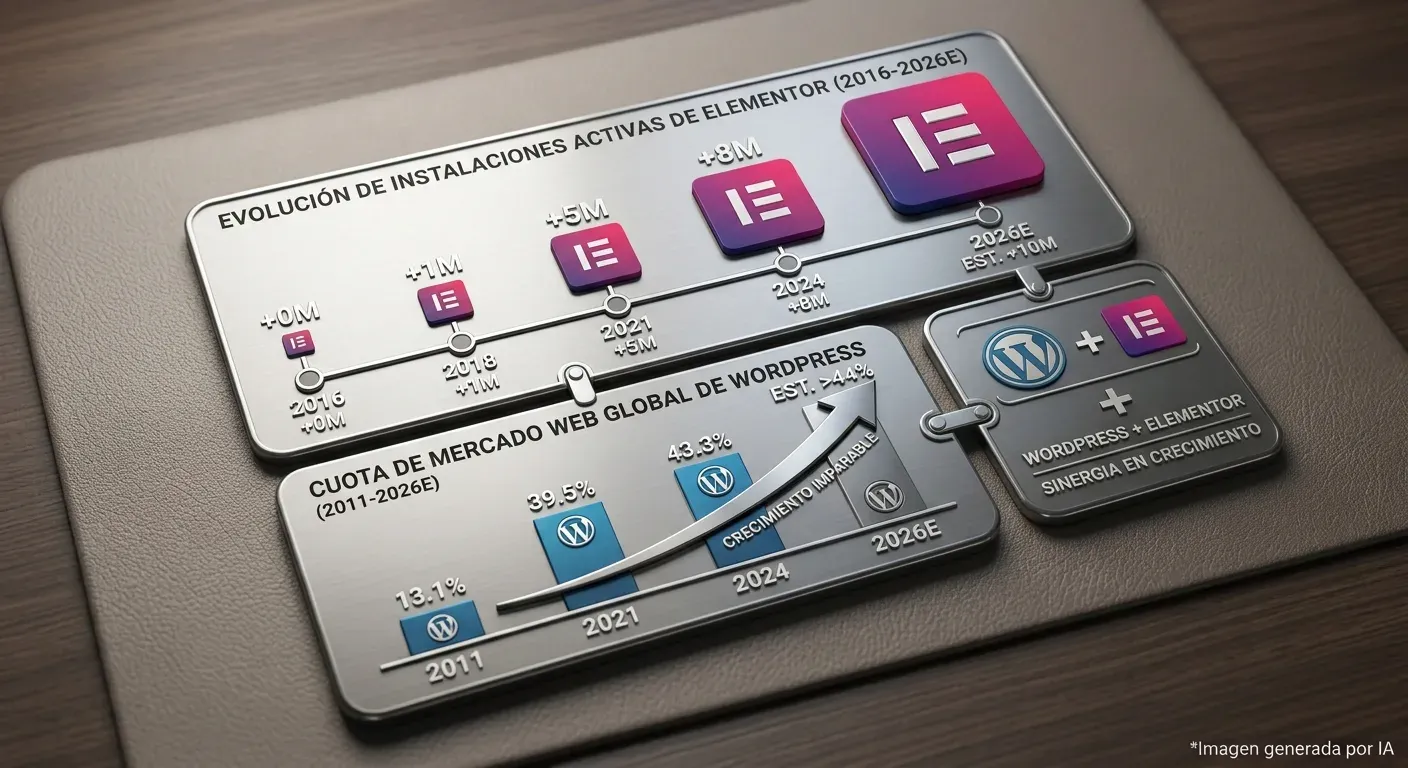
If your project fits several of these points, WordPress with Elementor, or even the native block editor directly, may well be the right option. In fact, Elementor says that more than twenty-two million pages have been created with its platform (a figure cited by the tool itself and subject to change), so it wouldn’t make sense to rule it out from the start.
When it’s not the best option
Here’s the uncomfortable part. As a project’s demands grow, Elementor starts to show its limits. Not only because of the heavy design, which has improved over the years, but because the base it’s built on (WordPress) also requires maintenance. As more features are needed, more and more plugins tend to be installed, which can turn the website into a monster that consumes more resources than it should and demands even more maintenance.
Performance and Core Web Vitals
Elementor loads a notable amount of CSS and JavaScript (though it has improved over the years). Add the usual plugins (sliders, galleries, optimisers…) and it’s easy for a page that should load instantly to end up hurting LCP and INP. And speed isn’t just a cosmetic issue: Google uses it as a signal and, above all, users abandon slow websites.
Real customisation
A visual editor gives you freedom… within what its widgets allow. When you need custom behaviour (a form with logic, a specific integration, a particular animation), you end up fighting patched CSS or third-party plugins that contradict each other.
The most common solution is to install a plugin for every element you want to add, because that one fits the aesthetic you’re after. That way you end up with dozens of plugins and hundreds of features overloading WordPress, just for one specific function from each.
Maintenance and security
Every plugin is an attack surface and a piece that can break in the next update. A website “built on plugins” turns maintenance into constant patching: reviewing each plugin’s updates, keeping WordPress up to date and checking which plugins have stopped receiving support in order to replace them or commission custom development. And that’s without counting on them possibly becoming incompatible with new versions of WordPress!
You can check the vulnerabilities that keep appearing in the WordPress news and in the INCIBE alerts. If you don’t keep your website updated, your clients’ data and your corporate image can be seriously affected, and a security breach involving personal data can lead to penalties under the GDPR.
Scalability
A large-catalogue ecommerce site, a web app with business logic or a project that will grow over the coming years usually exceeds what a page builder can sustain with good performance. That doesn’t mean it won’t work, but that for certain integrations it can fall short.
When you want to connect it with your company’s CRM or a logistics system, or handle significant traffic, any unnecessary additional load can make you spend more time and money on maintenance or on more powerful hosting, and even lose customers because checkout pages are slow.
Dependency
If your website depends on a page builder and tomorrow you want to change its design or platform, migrating can be costly: the design and layout are tied to that tool and have to be redone from scratch. It’s true that any migration involves adapting the design to the new platform, but when the content and structure live in open formats (Markdown, a headless CMS, a custom theme), a large part of the work is reused. With a page builder, much less.
Criteria for deciding (without dogma)
The right question isn’t “Is WordPress good or bad?” but “What does this project need?”. These are the questions we ask ourselves before choosing any technology:
| Factor | Key question | If the answer is… |
|---|---|---|
| Self-management | Does the client want to edit their content alone? | WordPress + visual editor |
| Performance | Is speed critical for conversion? | Optimised site or static generation |
| Customisation | Is there custom logic or behaviour? | Custom development or headless |
| Scalability | Will it grow a lot in 2-3 years? | An architecture that adapts, not patches |
| Budget/deadline | What investment and time are there really? | Balance all of the above |
The right answer is usually “it depends”. As a studio born in Galicia, we couldn’t pass up the chance to use a word that defines us so well. And anyone who offers you a single answer for every project is selling you convenience, not advice.
There’s no closed answer without analysing why the website is being created, how it’s going to be used and what type of website you want (landing, ecommerce, blog…). So if you ever commission a website, be ready to answer a good few questions. And if nobody asks you any… be suspicious!
Because to create something that represents you and is useful, you have to know your business and your customers. And nobody is better placed than you to answer those questions!
How we apply it ourselves
Our current focus is app and video game development, but websites are still part of what we do, and we apply these same criteria. We use tailored WordPress when it really fits: content websites, medium-sized ecommerce stores with WooCommerce, personal websites or projects that need small continuous improvements. When performance, scalability or customisation require it, we turn to technologies like Laravel or Astro.
Because the most used technology shouldn’t dictate the choice. The choice must come from your project, your goals and your needs.
In the next post we tell you which technologies we choose to build our own websites, and why.
Spoiler: there’s no single answer, not even for us. Every project is unique and technology must adapt to it, not the other way around.
Loading comments…