An app doesn’t start with a screen. It doesn’t start with a line of code either. It starts by making decisions.
Before building a feature, choosing a library or defining an architecture, we need to know what we’re building, why we’re building it and how we’ll maintain it as the project grows.
At CraftingBits we see app development as a process that starts long before programming. We analyse the project, define its scope, design the experience, build an architecture that can grow and check that everything works before we reach launch.
But there’s a part of that process that often goes unnoticed: documenting the decisions that make everything else possible. Because months later, nobody should have to rely on memory to know why an app is built a certain way. That’s why, before programming, we also build the project’s documentation base.
Memory is a bad place to keep decisions
Every project produces hundreds of small decisions.
Which architecture to use.
Which version of a library to adopt.
How the layers communicate.
Where certain data is stored.
Which screens exist.
How a particular feature works.
What’s still pending before release.
At first everything seems obvious. The project is small and the decisions are recent.
The problem shows up months later. Or when someone new joins the project. Or when we have to revisit a feature built a long time ago.
Without documentation, continuing development means rebuilding the context. And that has a cost. Decisions that were already made get discussed again, answers are searched for in old conversations, and doubts appear that a note written at the right time could have avoided.
That’s why we have a simple rule:
If a decision matters to the project, it shouldn’t live only in one person’s memory.
Two levels of documentation
To avoid that, we work with two different levels of documentation. On one side there’s the master technical document. On the other, each project’s Obsidian vault.
Although they’re related, they don’t serve the same purpose.
| Master technical document | Obsidian vault | |
|---|---|---|
| Scope | All our projects | A single project |
| Purpose | Define criteria and standards | Document the project’s reality |
| Content | Recommendations and rules | Decisions and current state |
| Example | Recommended architecture | Architecture actually used |
| Evolution | Changes with our method | Changes with the application |
| Goal | Not starting from scratch | Not losing context |
The difference matters. The master document can state that we work with stable, supported versions. The specific project must record which versions it actually uses. The master defines the criterion. The vault documents how that criterion is applied.
That gives us something that sounds simple but is very useful: each project can benefit from accumulated experience without becoming a copy of another project.
The master technical document
The master document is our shared reference. It isn’t meant to describe a specific application. It defines the criteria we want to apply every time we start a project.
Among other things, it covers:
- Stack and versions: language, SDKs, main libraries and reference versions.
- Architecture: how layers and responsibilities are organised.
- Monetization and consent: ads, payments and consent management.
- Release requirements: privacy, permissions, data forms and store requirements.
- Testing: what we should test and with which tools.
- Security: secret management, obfuscation and integrity.
- Release: versioning, package format and launch checklist.
It isn’t a document created to show how we work. It’s a working tool. We consult it when starting a project and update it when our tools, the platforms or the release requirements change.
That’s why there’s also an important rule:
The master document is versioned and dated.
A technical recommendation without a date can become outdated. A dated decision lets you know which criterion was in force when it was made. That’s also where Git comes in, making version control and backups easier.
The Obsidian vault: the project’s memory
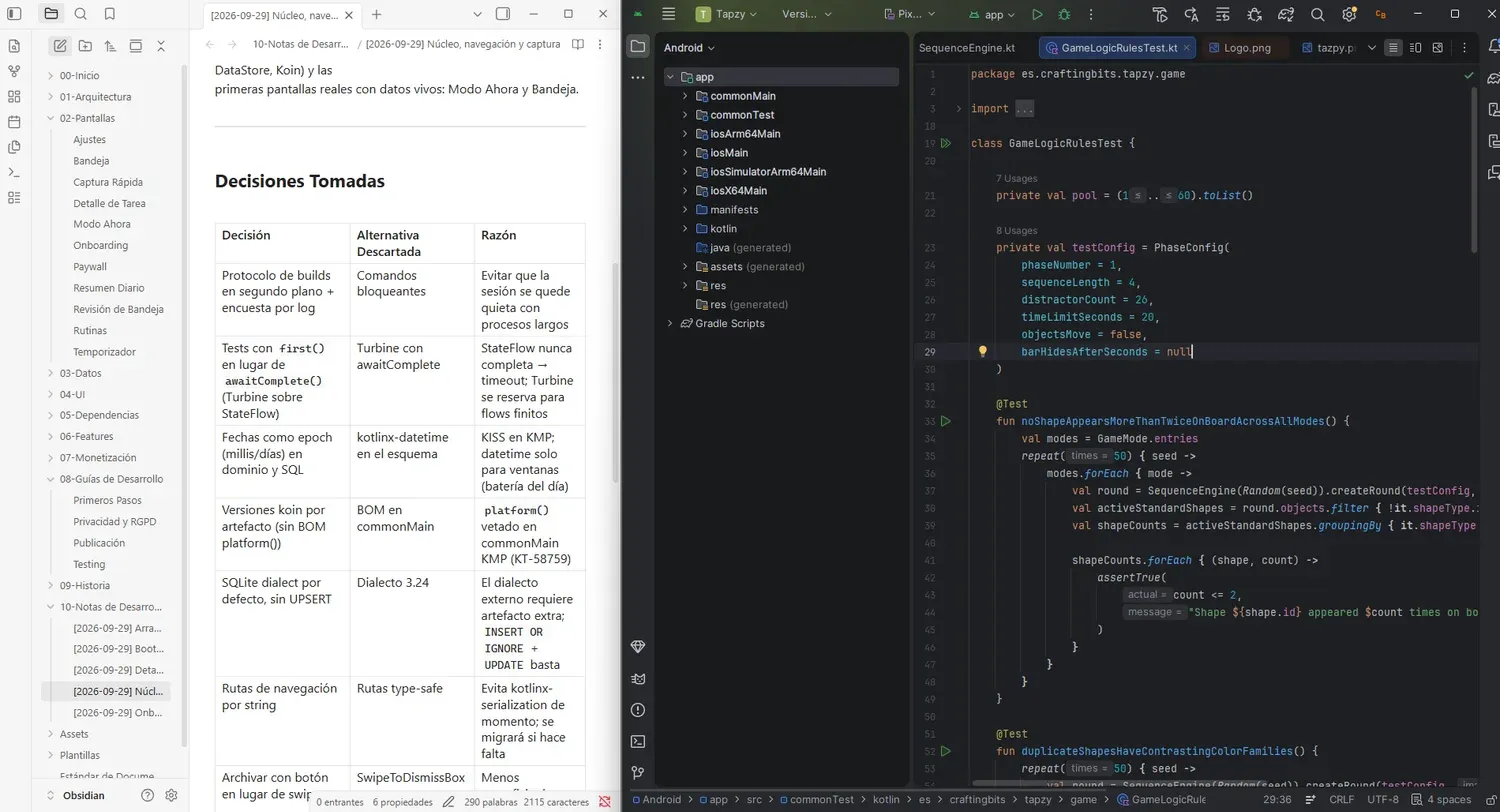
The second level is much more concrete. Every application has its own Obsidian vault.
Obsidian lets us organise the project’s knowledge into notes linked to each other, keeping a structure we can consult and extend throughout the whole development cycle.
The first piece is an index. Its job is simple: answer the basic questions quickly.
What project is it?
What version is it on?
Which platforms does it support?
What architecture does it use?
Which languages does it have?
What state is it in right now?
When we come back to a project after several weeks or months, we want the first answers to be seconds away.
From there we organise the vault into different areas:
- Home: general information, quick facts and a version log.
- Architecture: project structure and data flow.
- Screens: one note per screen.
- Data: models, storage and rules.
- Interface: navigation, theme and reusable components.
- Dependencies: stack and exact versions.
- Features: documentation of the relevant features.
- Monetization: ads, payments and consent.
- Development guides: processes to develop, test and release.
- Templates: reusable structures to keep documentation consistent.
It’s not about documenting for the sake of it. The structure exists so that finding information is fast and keeping it up to date is easy.
One screen, one note
One of our rules is especially simple:
One screen, one note. One feature, one note.
It might seem like a small decision, but it changes the way we work quite a bit. Instead of having a huge document where features, screens and decisions are mixed together, every important element has its own space. That makes it possible to consult, update and link information without having to go through a whole document.
On top of that, every note starts from a common template. That way, documenting a new screen doesn’t mean asking ourselves every time what information we should include. The structure already exists. And when a repetitive task has a clear structure, it depends less on memory and on whoever is doing it.
Documenting what doesn’t work yet
There’s another important part of our documentation: we don’t only record what’s finished. We also document what’s missing.
A screen that’s defined but not wired up yet. A dependency added during a test. Code that’s no longer used. A test that’s still provisional. A decision still pending. A tweak we want to make before launch.
This matters especially because a project in development is never completely clean. There’s always something pending. The difference is whether we know what it is and why it’s there.
Undocumented debt turns into a surprise. Documented debt turns into a task.
And that difference matters a lot when a project comes back to us after some time.
Turning knowledge into processes
Documentation also helps us with more than looking things up. It lets us turn repetitive tasks into processes.
For example, adding a screen has a guide. Publishing a new version has another. Preparing a release can become a checklist. Checking certain requirements before release can always follow the same steps.
The goal isn’t to fill the project with lists. It’s to stop important tasks from depending on remembering every step each time.
When a process is written down, we can review it, improve it and repeat it. And when the process changes, we update the guide.
From planning to development
This way of working fits something we consider essential at CraftingBits: development isn’t an isolated phase.
Before development there’s analysis. Then comes design. Then architecture and development. And before launch there’s testing, review and release preparation.
Documentation connects all those stages. The analysis defines what we want to build. The design defines how we want it to be used. The architecture defines how we’re going to build it. Development turns those decisions into software. Testing checks that what we built matches what we defined. And documentation preserves the context throughout the journey.
That’s why we don’t see documentation as an add-on to development.
It’s part of the development process.
What do we get from this system?
The end goal isn’t to have lots of notes. It’s to have less uncertainty.
When we pick a project back up, we don’t need to rebuild it from scratch. When we develop a feature, we know where it fits. When a decision needs revisiting, we can look up why it was made. When it’s time to release, we have a process we can follow.
And when we start a new project, we don’t start completely from zero: we can reuse the criteria, templates and lessons accumulated in previous projects.
In other words:
We document once so we don’t have to solve the same problem every time.
The method continues
This article is only the first part of a series in which we’ll explain how we plan and structure an application before and during its development.
The journey starts from this base and continues with:
- The base: master document and Obsidian vault.
- The master technical document.
- Project conventions.
- Product scope.
- Layered architecture.
- Data flow, state and dependency injection.
- The data model.
- Navigation and the screen map.
- The design system.
- How to document a screen.
- How to plan a complex feature.
- How to organise and move data.
- Localization from the design stage.
- Monetization and privacy.
- Testing.
- Release and versioning.
- Technical debt.
Each chapter builds on the decisions made before it.
Because that’s precisely the point of this method:
Not building an application out of isolated decisions, but moving forward on a base we can understand, review and maintain.
Writing first to program better
Programming is an important part of building an application. But it isn’t the only one.
A good architecture, a coherent interface, a well-defined scope, a testing process and a controlled release all start long before writing code. That’s why, in our projects, we try to settle first the decisions that will shape everything else. And we leave those decisions written down.
Because in six months we might not remember why we chose a particular solution. But if the decision is documented, we can go back to it.
We don’t document to write more. We document to have to remember less.
In the next chapter we’ll go into detail about the master technical document: what it contains, how we structure it and why we consider it one of the first pieces of any project.
Loading comments…